Thinka for KNX — FAQ
What Do I Need to Use Thinka in My Home?
Ready to experience smart home convenience with Thinka? Here’s what you’ll need for a smooth installation and setup:
- KNX Installation: An existing KNX system is required in your home for Thinka to function.
- Internet Connection: Make sure you have a free ethernet port and a mains socket available for Thinka.
- Project File (Optional): For configuration, an ETS4 or ETS5 project file can make setup even easier, but it’s not mandatory.
- Modern Browser: The setup process is seamless on up-to-date browsers—IE 11, Safari, and Chrome are fully supported.
- Device Compatibility: Configure Thinka quickly from your PC, Mac, or tablet.
Want to control your KNX smart home with your voice? Just use any of the following devices:
- iPhone
- iPad
- HomePod
- Amazon Echo
- Google Home devices
Get started with Thinka and bring effortless control to your KNX smart home today!
- DIN Rail Installation: Thinka is designed to be mounted easily onto the DIN rail inside your meter box, ensuring a secure and reliable setup.
- Professional Installation Recommended: For the best results, we recommend having a certified KNX system integrator handle the installation. Their expertise guarantees your Thinka will work flawlessly with your home automation system.
- Step-by-Step Video Guide: Want to see how it’s done? Visit our video channel for a detailed installation video that walks you through the entire process, making it easy to understand what to expect.
How to Enable Local Network Access for Thinka and HomeKit
To successfully pair your Thinka device with Apple HomeKit, you’ll need to make sure Local Network access is enabled on your iOS device. Here’s a simple step-by-step guide:
- Download the Thinka Companion app: Install the Thinka Companion app directly to your iPhone or iPad.
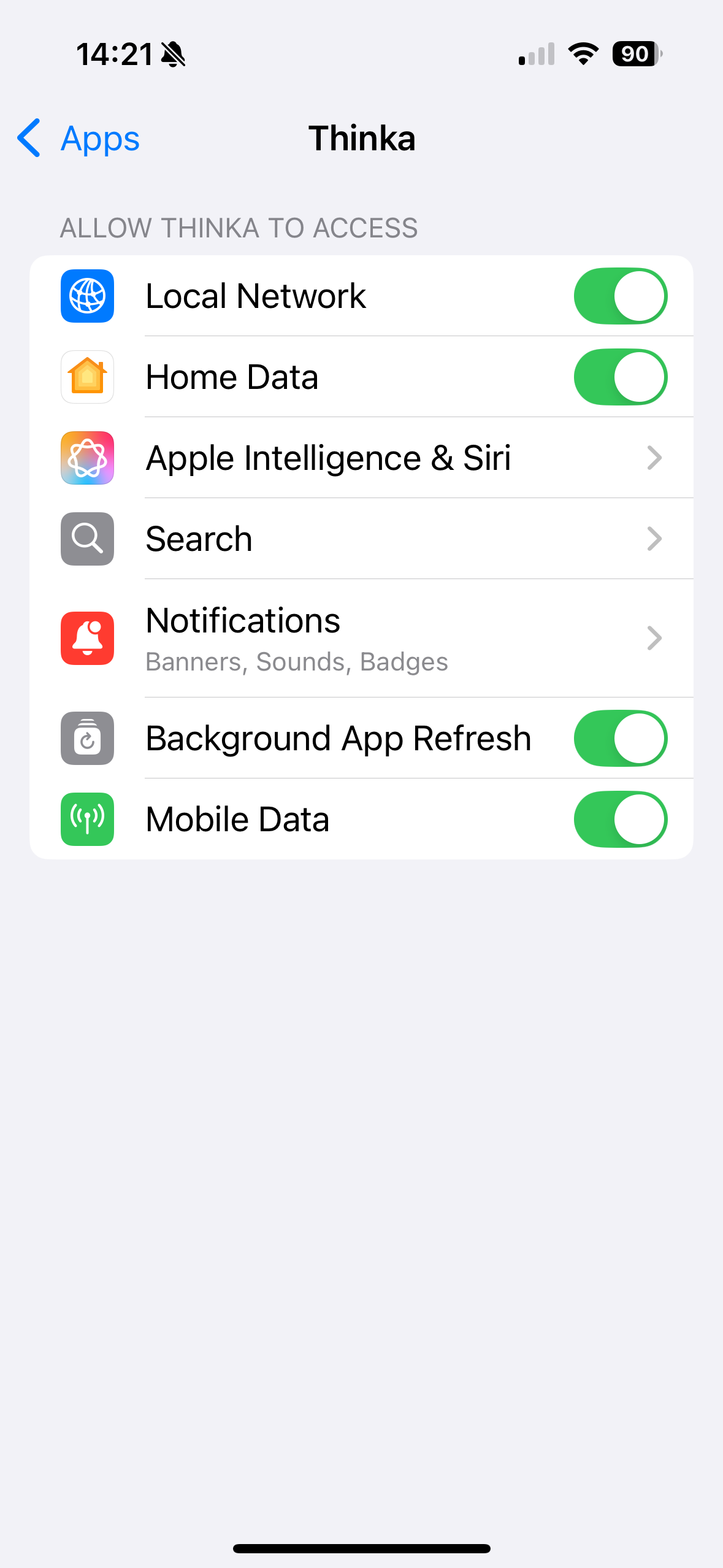
- Grant Local Network access: When you first open the app on iOS 14 or later, you’ll see a prompt: “Thinka would like to find and connect to devices on your local network.” Tap “OK” to allow access.
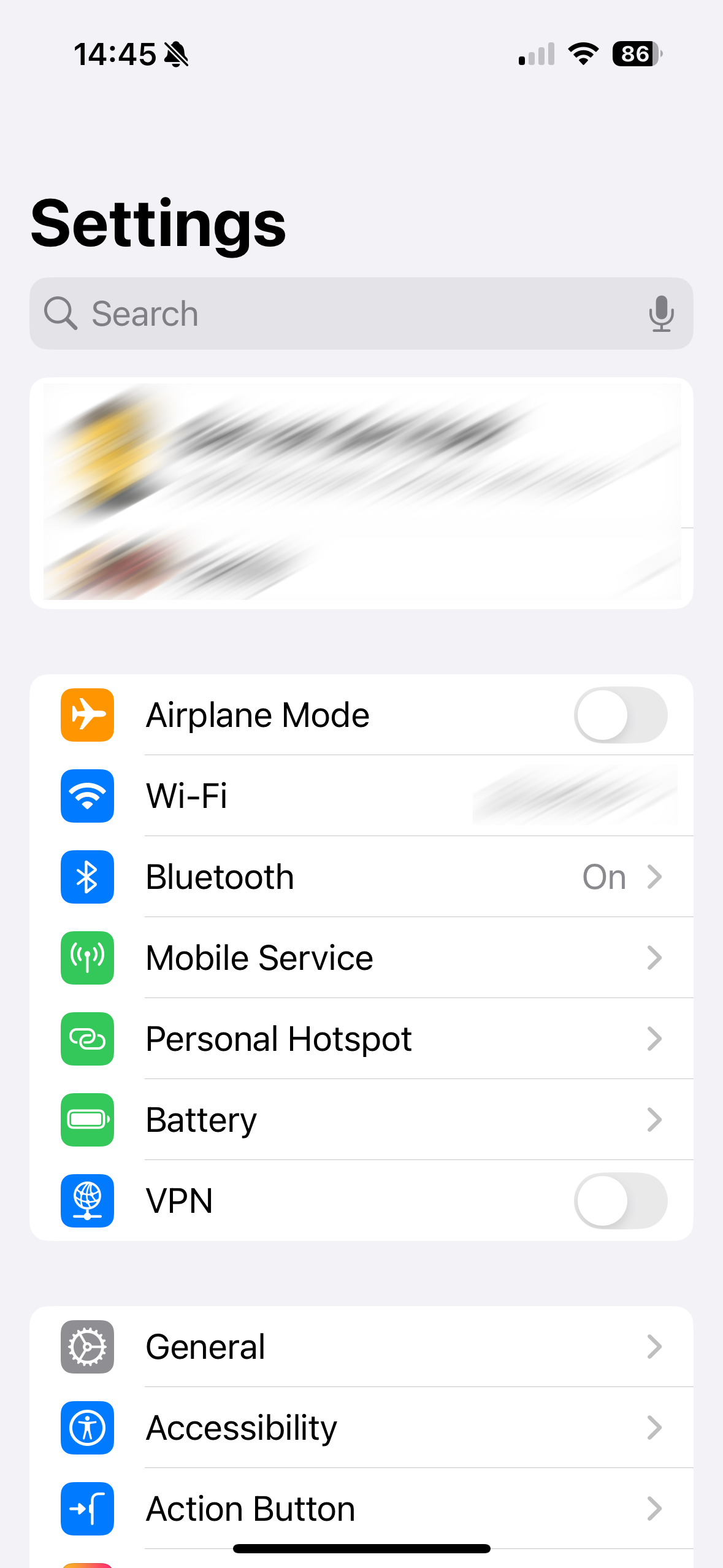
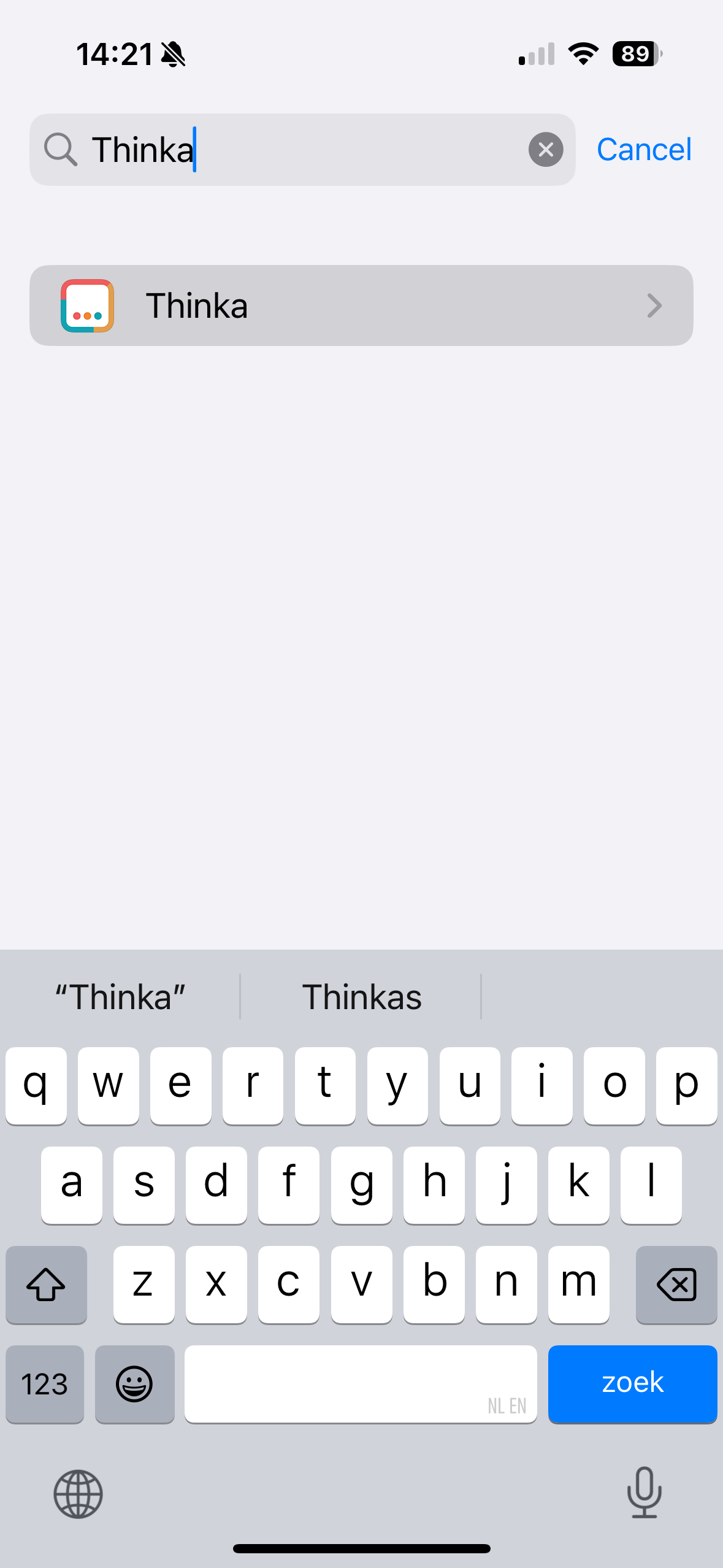
- Verify permissions: Go to your device’s Settings app to confirm that the Thinka Companion app has Local Network access enabled.
Enabling Local Network access is essential, as HomeKit pairing only works through your local network. Follow the images below for a visual guide:
Enjoy seamless smart home integration with Thinka and HomeKit!
Can the KNX Bus Power a Thinka?
Not all Thinka devices can be powered directly by the KNX bus. While newer Thinka models may support bus power, older versions such as the HKV1.2 and earlier cannot be powered this way. The KNX bus supplies approximately 320mA at 30V—less than 10 Watts—which is insufficient to reliably power both your KNX system and a Thinka device.
- Using the KNX bus to power incompatible Thinka versions can cause your KNX installation to become unresponsive due to inadequate power supply.
- To ensure stable operation, always use a dedicated KNX power supply or the official Thinka power supply provided with your device.
- This guarantees optimal performance and protects your smart home system from unexpected shutdowns or malfunctions.
For detailed instructions on safely powering your Thinka, please visit our guide: Powering the Thinka KNX.
Can the Thinka be Connected via Twisted Pair or an IP Gateway?
Yes, Thinka supports both connection options! Whether you prefer a traditional Twisted Pair (TP) setup or want the flexibility of an IP Gateway, Thinka has you covered.
- Twisted Pair (TP) Connection: Easily connect Thinka directly to the KNX bus using TP, as demonstrated in our helpful video guide.
- IP Gateway Configuration: Prefer a network-based solution? You can seamlessly configure an IP Gateway during Thinka’s setup process for a fast and flexible installation.
This versatility makes Thinka the ideal choice for any KNX smart home integration, ensuring compatibility with your preferred wiring or network infrastructure. Enjoy effortless setup and reliable performance—no matter which connection method you choose!
How Can I Prepare for My Thinka Installation?
Congratulations on ordering your Thinka! To ensure a smooth and hassle-free installation, we recommend taking a few simple steps to get ready:
- Watch Our Installation Video: Get a head start by watching our comprehensive installation guide. This video walks you through each step, making setup easy—even if you’re not a tech expert.
- Review Installation Requirements: Make sure you have all the necessary tools and compatible devices on hand for the installation process.
- Prepare Your Smart Home Network: Check your home Wi-Fi connection and location where you'll install Thinka for optimal performance.
- Read the User Manual: Familiarize yourself with the Thinka user manual to answer any questions before you begin.
By following these tips and watching our installation video, you’ll be ready to enjoy the full benefits of your Thinka smart home integration in no time!
How Do I Power My Thinka?
Powering your Thinka device is simple and flexible to suit your installation needs.
- Included Power Supply: Use the provided 12V/12W power adapter for quick and easy setup.
- Screw Terminals: Prefer a custom setup? Connect a 12-24V DC power source directly via the screw terminals for reliable performance.
- KNX Bus Power: If you have a Thinka HKV 1.3 or newer, you can conveniently power your device directly from the KNX bus—no extra power supply needed!
- Older Versions: For Thinka HKV 1.2 and earlier, an external 12V/12W power supply is required. The KNX bus does not provide enough wattage for these models, as it supplies less than 10W and powers other devices on the network.
Choosing the right power method ensures your Thinka operates efficiently and reliably. For more details about different Thinka models and their power requirements, visit our Thinka versions page.
Do I Need to Program My Thinka in ETS?
No programming in ETS is required to use your Thinka! Enjoy a hassle-free setup—simply install your Thinka device and follow the easy step-by-step instructions on the Thinka setup site.
- Quick Installation: Get your Thinka up and running in just a few minutes, without any complex programming.
- User-Friendly Process: The guided setup walks you through every step, making it simple for anyone to connect their Thinka to their smart home system.
- No Technical Skills Needed: You don't need to be a KNX or ETS expert—Thinka is designed for everyone.
Start enjoying all the smart features of Thinka right away—no extra software or technical know-how required!
Does Thinka Connect My Home to the Cloud?
No, Thinka keeps your smart home private and secure—right on your local network! When you use Thinka with Apple HomeKit, there’s absolutely no need for any external cloud connection. Your home automation stays within your own network, ensuring your data remains private and protected.
- Siri does require an internet connection to interpret your voice commands, but Thinka itself works seamlessly with your iPhone—even if you block its internet access.
- Unlike Amazon Alexa and Google Home, which operate their smart home solutions through the cloud, Thinka puts your privacy and control first with local processing.
- Thinka checks for software updates via its secure repository, but all installation is performed locally on your network for added peace of mind.
- The Thinka setup tool simply helps you discover your Thinka device on your local network—no sensitive information leaves your home.
Choose Thinka for a smart home experience that’s secure, private, and cloud-free!
Is Thinka Secure?
Your security and privacy are our top priorities at Thinka. Our smart home hub is built with advanced security measures to keep your data and home safe at all times.
- Robust Data Protection: Thinka uses cutting-edge encryption and security protocols to safeguard your personal information and smart home activity.
- Privacy by Design: We have engineered Thinka to ensure your data stays private and is never shared without your consent.
- Local Installation: Wondering about cloud storage? Discover more about our secure, local installation process in our detailed FAQ.
- Industry Recognition: Learn how security and data protection are fundamental to Thinka by reading our in-depth article in the news section and our featured interview on KNX Today.
Choose Thinka for a smart home hub that puts your safety first. Explore our resources to see how we protect your smart home every step of the way.
What Versions of Thinka Are Available?
Looking for the best smart home experience with Thinka? Currently, we offer two state-of-the-art versions:
- Thinka for KNX: HKV 2.1 – Our latest and most advanced version, now with power via the KNX bus for easy installation and seamless integration.
- Thinka for Z-Wave: ZWC HKV 2.0 – The perfect solution for Z-Wave home automation enthusiasts, bringing reliable connectivity and smart control to your devices.
Previous Thinka versions are no longer available, but here's a quick overview for your reference:
- HKV1.1 & HKV1.2 – Earlier models similar in function, but without KNX bus power capability. Learn more in our news section.
- Thinka beta (HKVBETA) – Supported HomeKit (uncertified by Apple), came in a grey casing, and did not work with Google, Olisto, or Amazon.
- Thinka for Amazon Echo (EV1.1) – Designed for Amazon Echo only, featured a black casing, and did not support Google, Olisto, or HomeKit.
Choose the latest Thinka version for the most advanced smart home integration!
Does Thinka for KNX Support Modbus, DALI, or Other Protocols?
Thinka for KNX is designed exclusively for KNX smart home systems. It does not support Modbus, DALI, or any other third-party protocols. This ensures seamless, reliable integration and enhanced control over all your KNX-connected devices.
- Control is limited to devices within your KNX installation
- No direct compatibility with Modbus, DALI, or alternative protocols
- Optimized for the highest performance and security within KNX environments
If you require integration with Modbus, DALI, or other systems, you’ll need a dedicated gateway or interface designed specifically for those protocols. By focusing solely on KNX, Thinka delivers a robust and streamlined experience for your smart home automation needs.
For the best results and maximum compatibility, we recommend using Thinka for KNX-certified devices only.
Thinka Pro reads a smart meter with a P1 port (DSMR) and shows the whole house's electricity, gas and feed-in on the Energy Dashboard. The meter is connected under Settings → P1 Energy Monitor → Connection. There are two ways to reach it: with a cable into the Thinka, or over the network.
Before you start
- A Thinka Pro (KNX or Z-Wave) on software 6.1 or newer. The P1 Energy Monitor is a Pro feature; a base Thinka shows it as an upgrade on the Energy Dashboard.
- A meter whose P1 port sends plain, unencrypted telegrams. Thinka recognises the dialect from the meter itself: DSMR 4/5 and DSMR 2.2/3.0 (Netherlands), eMUCS-P1 (Belgium, Fluvius), Smarty (Luxembourg, unencrypted), DSMR 5 (Sweden) and EasyMeter Q3D (Germany). Meters that encrypt their P1 output, such as Austrian meters and the encrypted Luxembourg Smarty, are not supported.
- In Belgium the user ports of a Fluvius digital meter are switched off by default. Activate the P1 port in the Fluvius customer portal (Mijn Fluvius) first; the meter stays silent until you do.
Option 1: cable
- Use a P1-to-USB cable: an RJ12 plug on the meter side and USB-A on the other. Cables built on an FTDI, CH340 or Prolific chip are recognised automatically.
- Plug the RJ12 end into the meter's P1 port and the USB end into a free USB port on the Thinka. The meter powers the cable; nothing else is needed.
- Open Settings → P1 Energy Monitor and under Connection choose Cable. Thinka shows the device it identified, normally /dev/tty-p1.
- Within a few seconds the status changes to Reading the smart meter and the Meter capabilities section fills in. A DSMR 5 meter sends a reading every second, a DSMR 4 meter every ten seconds.
Two kinds of cable are not identified automatically: cables built on a Silicon Labs CP210x chip (the same chip Z-Wave USB sticks use), and cables for a DSMR 2.2/3.0 meter, which runs its port at 9600 baud with 7 data bits and even parity instead of 115200 8N1. Contact support in those cases; the device path and serial settings can be set for you.
Option 2: network
Use this when the meter is too far from the Thinka for a cable. You need a device at the meter that forwards the raw P1 telegrams over a TCP port: a WiFi P1 dongle with a TCP or telnet ("raw") port, an ESP board running a serial-to-TCP bridge, or a Raspberry Pi running ser2net. A dongle that only offers a web page or a JSON API, without a raw TCP port, does not work.
- Install the bridge at the meter and note its IP address and the TCP port it forwards on. Give it a fixed address or a DHCP reservation in your router, so the address does not change. ser2net and most dongles use port 2001 by default.
- Open Settings → P1 Energy Monitor and under Connection choose Network.
- Enter the IP address or hostname and the port, and press Connect. Thinka first checks that something answers at that address and only then saves the setting.
- Within a few seconds the status changes to Reading the smart meter.
A serial P1 port can only be read by one program at a time, but most network bridges accept more than one reader, so Thinka can usually share the bridge with another system.
After connecting
- Enter the rates from your energy contract under Your rates, so the cost estimates match your bill. Empty fields use the average rates of your country, which Thinka derives from the meter's dialect.
- Older readings from your energy supplier can be imported from a CSV file, so the graphs go back further than the day Thinka was connected.
- To stop reading the meter, choose No meter. The recorded history stays; it can be removed separately.
Troubleshooting
- "no telegram since opening … ago": the port opened but the meter is silent. Check that the RJ12 plug is pushed fully into the meter, that the cable is a P1 cable and not a telephone cable, and in Belgium that the P1 port has been activated. A DSMR 2.2/3.0 meter needs the slower serial settings described above.
- "Nothing answered at that address": the bridge did not accept the connection. The message says why. ECONNREFUSED means the address is right but nothing listens on that port; ENOTFOUND means the hostname cannot be resolved; EHOSTUNREACH or a timeout means the address is not reachable at all. Check the IP address and port, and that the bridge is powered and on the same network as the Thinka.
- Rejected telegrams: a few are normal on a long or marginal cable; the checksum failed and the meter sends a new telegram a second later. A high share of rejected telegrams points to a poor cable or bridge.
- The link drops and comes back: Thinka reopens the port by itself a few seconds after a cable is unplugged or a bridge restarts. No action is needed.
- No gas reading: the Meter capabilities section shows what your meter reports. Gas only appears when a gas meter is coupled to the electricity meter over M-Bus; Swedish meters carry no gas at all.
- The P1 tab is missing: the P1 Energy Monitor is part of Thinka Pro and needs software 6.1 or newer. Check the version and update channel under Settings → Thinka.
How to Enable Matter Support on Your Thinka Device
Unlock the future of smart home connectivity with Matter Support on your Thinka device! Matter is currently available through our Beta channel, making your home even smarter and more compatible with leading platforms.
- Step 1: Send an email to support@thinka.eu and request Beta access for your Thinka device.
- Step 2: Our Thinka team will promptly move your device to the Beta channel so you can enjoy enhanced features and Matter compatibility.
- Step 3: Once notified, simply power-cycle your Thinka device (switch it off and back on) to activate Matter Support.
Enjoy seamless integration and improved performance by enabling Matter Support today. If you have any questions or need assistance, our support team is always here to help!