Thinka for KNX — FAQ
How Do I Turn On My Lamps?
Getting your lamps to light up with ease is simple and convenient! Follow these quick steps to enjoy effortless voice control:
- Set Up Your Lamp in Thinka: Make sure your lamp is properly configured in Thinka as either a switch or a lightbulb. Check the KNX settings for accuracy.
- Choose a Unique Name: Give your lamp a clear, easy-to-pronounce, and unique name—like “floor light”—to avoid confusion when using voice commands.
- Control with Alexa: Once set up, just say, “Alexa, turn on the floor light.” Your lamp will respond instantly!
With Thinka and Alexa, turning on your lights is hands-free, smart, and convenient. Enjoy a brighter home with just your voice!
How Do I Dim My Lights with Alexa and Thinka?
Dimming your lights is quick and easy with Thinka and Alexa! To get started, make sure your lamp is correctly configured as a lightbulb in Thinka (see the KNX setup guide for details). Once your lamp is ready, you can easily adjust the brightness using simple voice commands with Alexa.
- Set a specific brightness level: Just say, “Alexa, set the floor light to 50 percent.”
- Lower the light: Try, “Alexa, decrease the floor light by 25 percent.”
- Brighten up: Say, “Alexa, increase the floor light by 25 percent.”
With Thinka and Alexa, you have effortless control over your home lighting. Enjoy personalized lighting scenes and create the perfect ambiance in any room—all hands-free!
Is the Thinka for KNX Alexa Skill Available in My Country?
Looking to use the Thinka for KNX Alexa skill in your home? Currently, Thinka supports the following languages: English (US, UK, AU, CA, IN), German, French, Italian, Spanish, and Brazilian Portuguese.
- If your country’s primary language is not on this list, you can still enjoy Thinka by switching your Alexa language settings to one of the supported languages.
- This quick change allows you to access all smart home features provided by the Thinka for KNX Alexa skill, regardless of your location.
For step-by-step guidance on changing your Alexa language settings and more details about skill distribution, please visit the official Alexa developer information page.
Choose a supported language and unlock seamless smart home control with Thinka for KNX and Alexa today!
Can I Upgrade My Thinka for Echo to Support HomeKit?
No, your current Thinka for Echo cannot support Apple HomeKit due to different hardware requirements.
However, we make it easy for you to enjoy seamless smart home integration with all your favorite platforms! If you’d like to control your devices using HomeKit, Echo, and Google Home, you can take advantage of our convenient upgrade program. This program allows you to exchange your existing Thinka for Echo for a new Thinka model that supports HomeKit, Echo, and Google Home—all in one powerful device.
- Simple upgrade process—hassle-free exchange of your current device
- Multi-platform compatibility—enjoy HomeKit, Echo, and Google Home
- Future-proof your smart home—get the latest technology and features
Ready to upgrade? Click here and transform your smart home experience today!
Why Does My Curtain Appear as a Switch in the Alexa App?
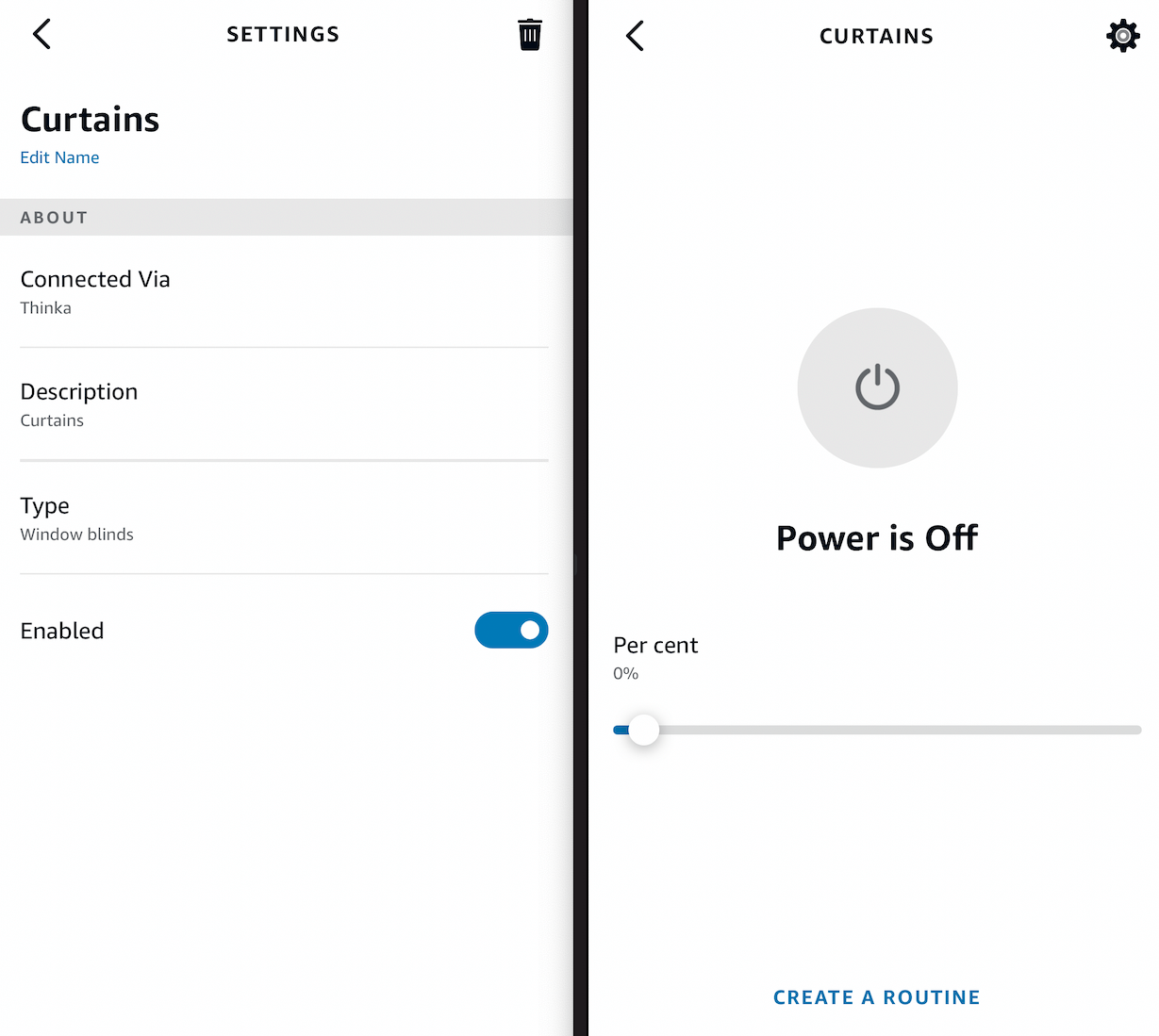
If you've noticed your smart curtain appears as a switch in the Alexa App, you're not alone! By default, Alexa offers limited control for window coverings—only displaying basic information and not allowing you to open, close, or automate your curtains (see image below, left).
To give you full smart home control, we've optimized your curtain to appear as a switch in Alexa (see image below, right). This simple change unlocks powerful features, letting you easily open, close, or adjust your curtain through both manual controls and Alexa routines.
You can still enjoy full voice command functionality, such as:
- Alexa, open the curtain
- Alexa, close the curtain
- Alexa, set the curtain to 35%
- Alexa, raise the curtain
- Alexa, lower the curtain
With this solution, you get seamless automation and smart control, maximizing your Alexa experience!
Looking for More Amazon Alexa Examples?
Absolutely! If you're interested in discovering more ways to use Amazon Alexa, you're in luck.
Explore a wide range of Alexa commands, skills, and helpful features by visiting the official Amazon Alexa website. You'll find:
- Step-by-step examples for voice commands
- Tips for maximizing your Alexa device experience
- Guides to popular Alexa skills and smart home integrations
- Creative ideas for daily routines, entertainment, and more
Whether you're new to Alexa or looking to get more from your smart assistant, the Amazon Alexa website is packed with inspiration and practical examples to enhance your smart home experience.
How Do I Close My Curtains with Alexa?
Closing your curtains with Alexa is simple and convenient! First, ensure your curtain is correctly set up in Thinka as a window covering (see KNX configuration). Once that’s done, you can control your curtains hands-free using voice commands.
- To close the curtains, just say: “Alexa, close the blinds” or “Alexa, turn off the blinds”.
- To open the curtains, say: “Alexa, open the blinds”.
- Want to adjust your curtains to let in just the right amount of light? You can partially open or close them by saying: “Alexa, set the curtain to 30 percent”.
Keep in mind, 100% means fully open (maximum light), while 0% is fully closed (maximum privacy). Enjoy effortless curtain control with Alexa and Thinka!
How to Connect Your Thinka to Amazon Echo: Step-by-Step Guide
Connecting your Thinka to your Amazon Echo is simple and lets you enjoy seamless smart home control through Alexa. Follow these easy steps to get started:
- On your Thinka: Go to Settings → Amazon Alexa and enable Alexa integration.
- Click the Enable button and wait for the indicator to turn green and display “enabled”.
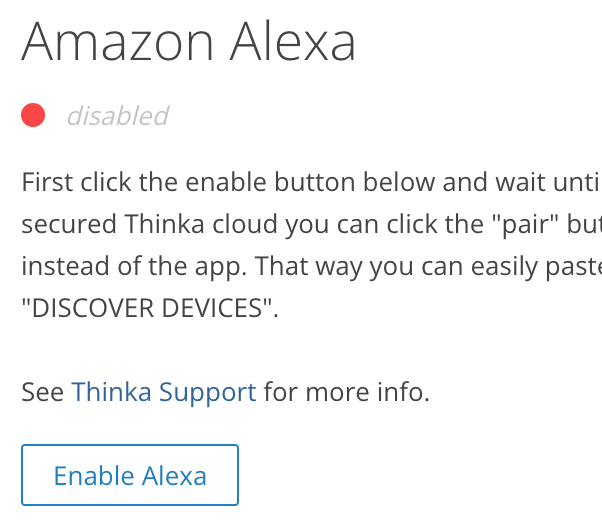
Your Thinka is now securely connected to Amazon through the Thinka Cloud.
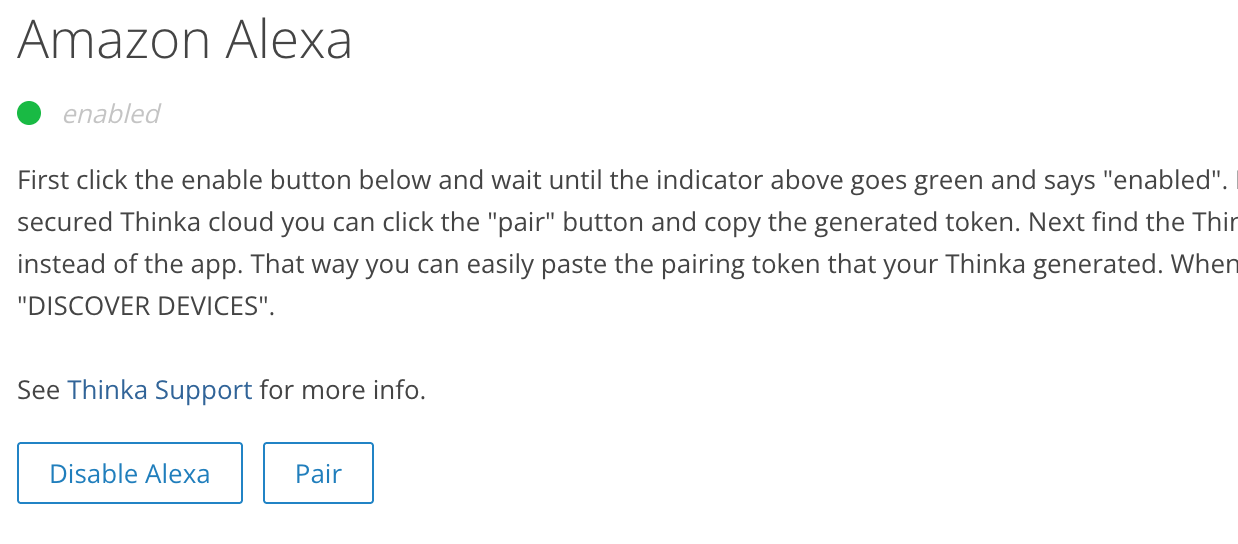
No Echo device required! You can control Thinka devices directly from the Alexa app or via Alexa Routines—even without an Echo. For voice control, simply use your Echo device.
- Next, click PAIR and copy the generated pairing token.
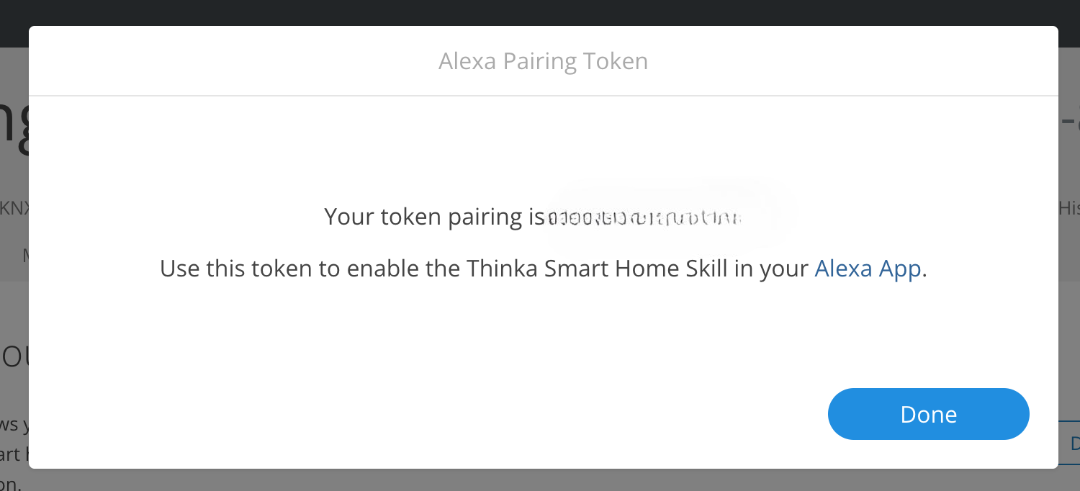
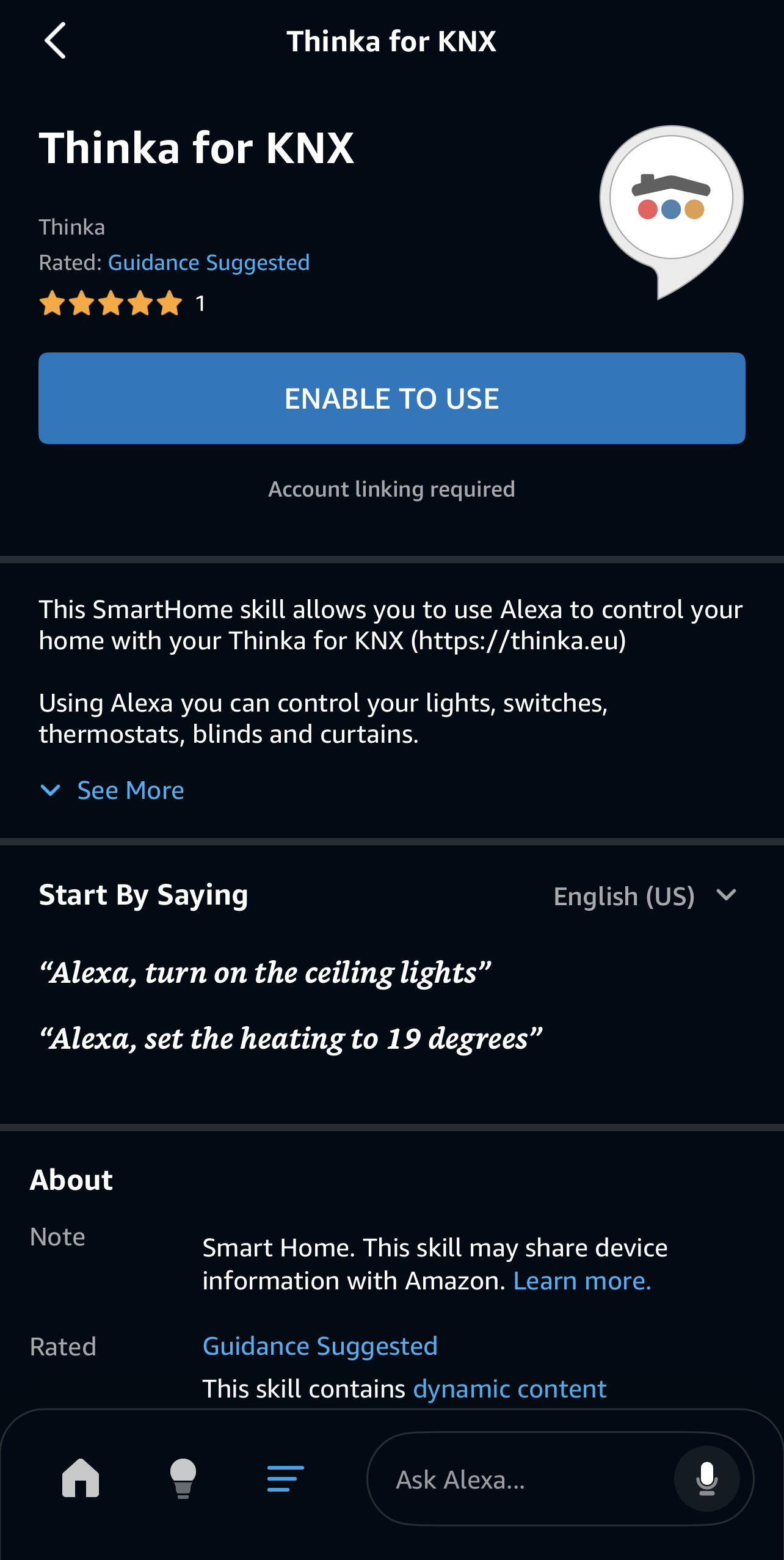
- In the Alexa app, go to Settings → Skills & Games, search for “Thinka”, and click ENABLE TO USE.
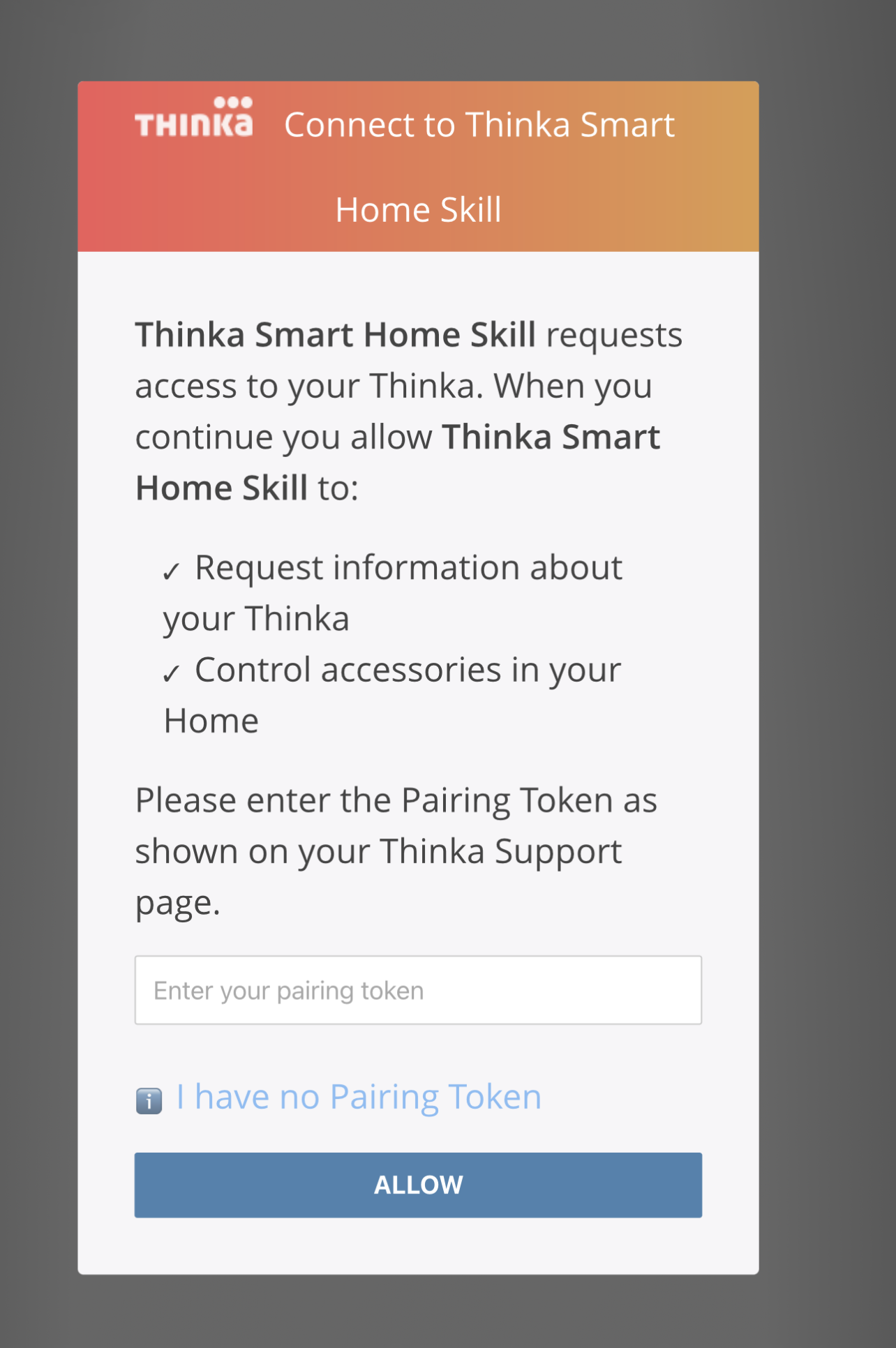
When prompted, enter the pairing token from Thinka and click ALLOW.
Once linked, your Thinka accessories will appear in the Alexa app—ready for smart home control!
Can I Use Google Home with My Thinka for Echo?
Currently, Thinka for Echo does not support Google Home integration. Only the Thinka HomeKit version is compatible with Google Home, as well as HomeKit and Echo.
- If you’d like to enjoy seamless control with Google Home, we offer an easy upgrade option to exchange your Thinka for Echo for a Thinka that supports HomeKit, Echo, and Google Home.
- With the upgraded Thinka, you’ll have the flexibility to use all three popular smart home platforms—Apple HomeKit, Amazon Echo, and Google Home—making your smart home even smarter and more convenient.
Ready to experience total smart home compatibility? Upgrade today and unlock the power of Thinka with Google Home support!
How to Set Your Thermostat with Amazon Alexa
Controlling your home's temperature has never been easier with Amazon Alexa! To get started, first ensure your thermostat is correctly configured in Thinka. For step-by-step guidance, visit our detailed Thermostat setup guide.
- Quick Voice Commands: Simply say, "Alexa, set the temperature to 21 degrees," and Alexa will adjust your thermostat right away.
- Room Control: Want to change the temperature in a specific room? Try, "Alexa, lower the temperature in the living room by 2 degrees."
- Hands-Free Comfort: No need to lift a finger—Alexa makes it easy to keep your home cozy and energy-efficient with simple voice instructions.
Enjoy effortless temperature control and a smarter, more comfortable home—just ask Alexa!
Can I Use Olisto with My Thinka for Echo?
Currently, only the HomeKit version of Thinka supports Olisto integration. If you have a Thinka for Echo, Olisto is not available with your current device.
- To enjoy Olisto features, you can easily upgrade your Thinka for Echo.
- We provide a convenient upgrade service that allows you to exchange your current Thinka for Echo for a Thinka that offers compatibility with HomeKit, Echo, and Google Home.
- This upgrade opens up more smart home possibilities and ensures you get full Olisto support.
Upgrade today to unlock the power of Olisto and enjoy seamless integration with all your favorite smart home platforms!
Can I Ask for the Temperature of My Heating?
Absolutely! Checking the temperature of your heating system is quick and easy with Alexa.
- Simply say, “Alexa, what is the temperature in here?”
- Alexa will instantly provide you with the current room temperature, helping you stay comfortable year-round.
- This feature is perfect for monitoring your home’s climate and making sure your heating settings are just right.
Enjoy convenient, hands-free control and real-time temperature updates with Alexa. Stay informed and comfortable with just a simple voice command!