When trying to sync Thinka with HomeKit I get the message that the synchronisation failed
Why Am I Seeing a "Synchronization Failed" Message When Syncing Thinka with HomeKit?
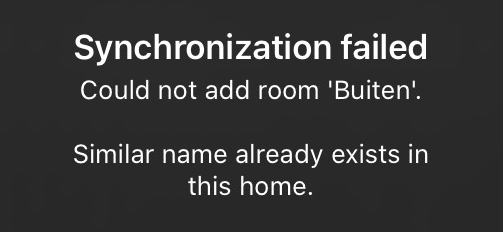
If you receive a "synchronization failed" message while syncing your Thinka with Apple HomeKit, don’t worry—this is a common issue and can usually be resolved quickly. Here’s how you can troubleshoot and successfully connect Thinka to HomeKit:
- Check Your Network: Make sure both your Thinka and your iOS device are connected to the same WiFi network.
- Restart Devices: Try restarting both your Thinka and your iPhone or iPad to refresh the connection.
- Update Software: Ensure that your Thinka and your Apple device have the latest firmware and iOS updates installed.
- Reset HomeKit Setup: If the problem persists, consider resetting your Thinka’s HomeKit pairing and then attempt setup again.
Still having trouble? Contact Thinka Support for expert help. We’re here to ensure your smart home experience is seamless!