How do I configure my Air-conditioning?
KNXHow to Configure Your Air-Conditioning in HomeKit
Setting up your air conditioning in HomeKit is simple and intuitive! In HomeKit, your air conditioning system is managed as a Thermostat accessory, giving you full control and comfort directly from the Home app.
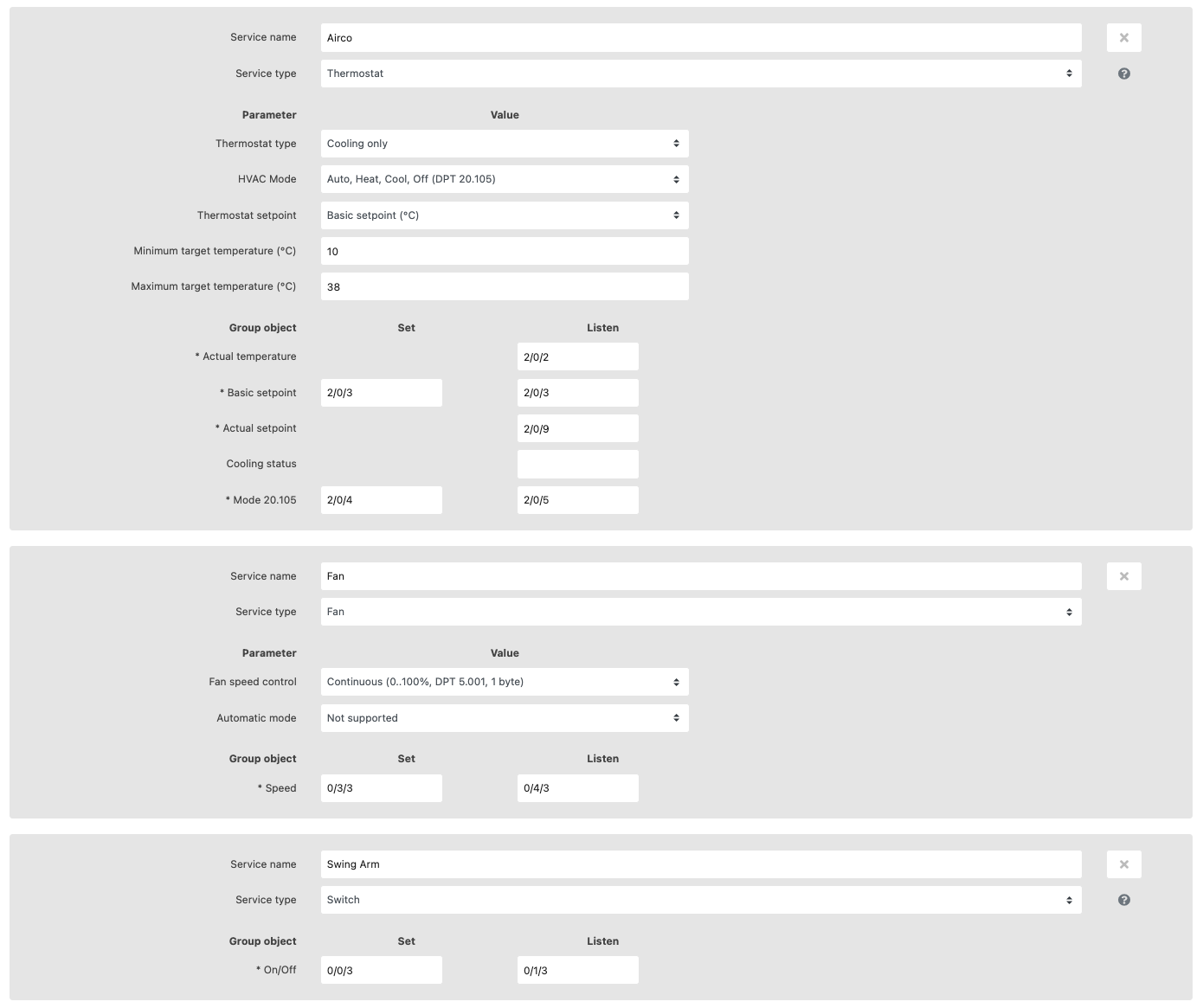
- Select Your Thermostat Type: Choose between heating, cooling, or heating and cooling. For systems that provide both, select whether switching modes should be manual or automatic.
- Choose HVAC Mode: Opt for basic On/Off control or advanced KNX modes—HVAC (20.102) or HVAC Control (20.105). For air conditioning, the 20.105 mode is ideal and supports Auto, Heat, Cool, and Off.
- Adjust Setpoints: Control your air conditioner’s setpoint directly or shift it using temperature differences or counter values. Ensure the steps and parameters match your KNX airco settings.
- Set Temperature Limits: Define minimum and maximum target temperatures for precise climate control within your home.
- Configure Group Addresses: Assign group addresses for actual temperature, setpoints, heating/cooling messages, and mode controls based on your preferences.
Tip: Add Fan and Swing Arm controls as separate services for enhanced comfort, as shown below.
Note: This accessory is not available with Google integration.